
How to A/B Test Newsletter Upgrade Pages: Beehiiv + Humblytics Guide for 2026
Beehiiv's native A/B testing only covers email subject lines, not your upgrade page. Here's how to A/B test your Beehiiv paywall and upgrade page with Humblytics to convert more free subscribers to paid, scored in revenue.
·

The short answer: Beehiiv's built-in A/B testing only tests email subject lines, it can't split-test your upgrade page or paywall. To A/B test the page where the upgrade actually happens, run two versions of the upgrade/paywall page to the same readers and keep the one that converts more free subscribers to paid, scored in subscription revenue, not clicks. Add a cookie-free script, test the headline, CTA, and the price point itself, and read the winner in MRR. See revenue A/B testing and Humblytics for newsletters.
Newsletter monetization continues to accelerate in 2026, with the paid newsletter market now estimated at over $3 billion globally. Platforms like Beehiiv, Substack, and Kit (formerly ConvertKit) have made it easier than ever to launch a paid newsletter, but the real challenge isn't getting free subscribers. It's convincing them to pull out their credit card and upgrade to premium.
Most newsletter creators treat their upgrade page as an afterthought. They write some copy, pick a price, and hope for the best. That's leaving money on the table. A/B testing lets you systematically optimize every element of your upgrade experience so you convert more free readers into paying subscribers, without guessing.
This guide walks you through exactly how to set up A/B testing on your Beehiiv newsletter upgrade pages using Humblytics, a lightweight, cookie-free analytics and split testing tool built for creators who care about performance and privacy.
Why Humblytics? At just 36KB, the tracking script won't slow down your pages. It's completely cookie-free, which means no annoying consent banners popping up for your subscribers. And it includes server-side split testing, heatmaps, and funnel tracking, everything you need to optimize your newsletter revenue.
Beehiiv's Native A/B Testing: What It Can (and Can't) Test
Before you reach for a third-party tool, it's worth knowing exactly what Beehiiv does on its own, because the gap is the whole reason this guide exists.
Beehiiv has built-in A/B testing, and it's good at one specific job: testing email subject lines. On the Grow plan you can test two subject lines; on the Scale plan you can test up to four. You pick your variants, set a sample size (anywhere from 1% to 100% of your list), and choose a test duration (Scale-plan users can set anywhere from 5 to 240 minutes). Beehiiv sends each subject line to an even slice of the sample, watches open rates, then automatically sends the winning subject line to everyone who's left. Once a test starts, you can't end it early, which is actually good discipline, since it stops you from calling a winner on noisy early data.
That's genuinely useful. The subject line decides whether your email gets opened at all, and nothing downstream matters if the email stays unread.
But here's the limitation that trips up most creators: Beehiiv's A/B testing stops at the inbox. In Beehiiv's own words on its A/B testing feature page, when asked whether you can test more than subject lines: "No, right now you can only test subject lines, but content A/B testing is on the roadmap." There's no native way to test send times, email content, or, most importantly for revenue, your upgrade page or paywall.
What Beehiiv Can't Split-Test
Beehiiv gives you a fully customizable paywall. You can set the title, a description, a benefits list, the button text (it defaults to "Upgrade"), an attached offer like a discount or free trial, and the colors and styling. You can even build several paywalls and pick a default, then drop a paywall break into a post so free readers hit the wall at the exact spot you choose. (New to this? See our Beehiiv paywall setup and optimization guide.)
What you can't do inside Beehiiv is randomly split your readers between two different paywalls or two upgrade pages and measure which one converts more subscribers. There's no built-in experiment that pits "$8/mo founder pricing" against "7-day free trial," or a benefit-led headline against a curiosity-led one, and reports the winner. Beehiiv lets you configure the upgrade experience; it doesn't let you test it.
This matters because the decision to pay almost never happens inside the email, it happens on the upgrade page. That page combines your headline, offer, pricing, social proof, and layout in one place, which is exactly why small changes there move revenue more than almost anything else you can tweak.
Beehiiv Native A/B Testing vs. Humblytics
| Beehiiv (native) | Humblytics | |
|---|---|---|
| What it tests | Email subject lines (2 on Grow, up to 4 on Scale) | Upgrade page, paywall, pricing, headline, CTA, layout |
| Where the test runs | The inbox (the email send) | The upgrade / paywall page (the web) |
| Winning metric | Open rate | Conversions and subscription revenue (MRR) |
| Test length | Minutes to a few hours | Days to weeks (until significance) |
| Tests landing & upgrade pages? | No | Yes |
| Plan needed | Grow or above | Any plan, from $79/mo |
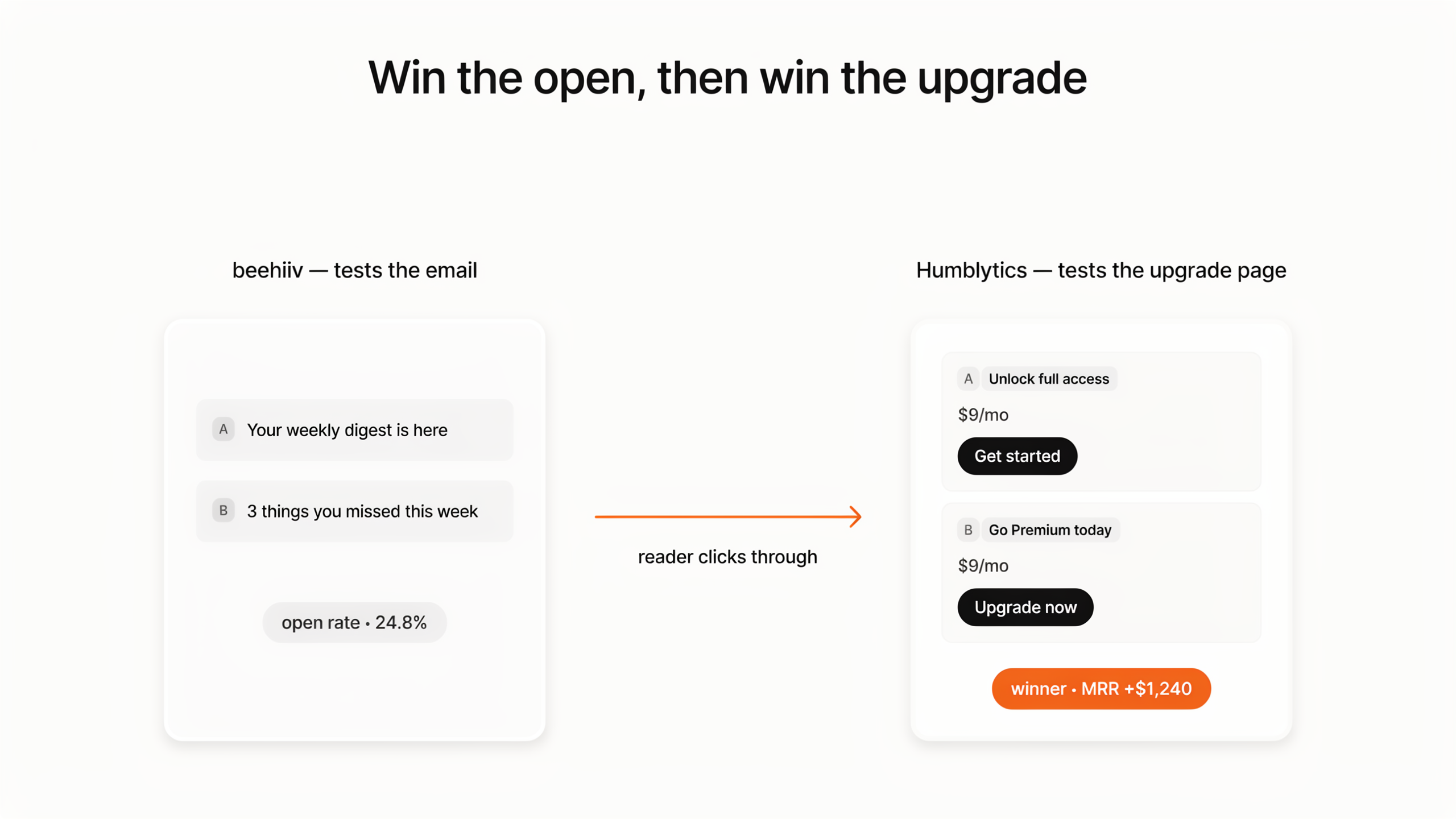
The clean way to think about it: use Beehiiv to win the open, and use Humblytics to win the upgrade. Test your subject lines in Beehiiv to get more readers onto the upgrade page, then test the upgrade page itself in Humblytics to convert more of them into paying subscribers. The two tools don't compete, they cover different halves of the funnel.
Why A/B Test Your Newsletter Upgrade Pages?
The Math That Makes This Obvious
Let's run some numbers. Say you have 10,000 free subscribers and your current upgrade page converts at 2%. That gives you 200 paid subscribers.
Now imagine you improve that conversion rate to just 3% through A/B testing. That's 300 paid subscribers, 100 more people paying you every month.
At $10/month per subscriber, that single percentage point improvement is worth $12,000 per year in additional revenue. At $15/month, it's $18,000. And this compounds: as your free subscriber list grows, that optimized conversion rate keeps paying dividends on every new reader.
Here's the math laid out:
| Metric | Before Testing | After Testing |
|---|---|---|
| Free subscribers | 10,000 | 10,000 |
| Upgrade conversion rate | 2% | 3% |
| Paid subscribers | 200 | 300 |
| Monthly revenue ($10/mo) | $2,000 | $3,000 |
| Annual revenue | $24,000 | $36,000 |
That's a $12,000/year difference from a single successful test. And most newsletter creators run their upgrade page without ever testing a single element.
What's at Stake: The Paid Newsletter Market in 2026
This isn't a niche side hustle anymore. The global daily-newsletters market is valued at roughly $16.08 billion in 2026 and is projected to reach about $27.08 billion by 2035 (a 6.4% CAGR), according to Business Research Insights. Newsletters sit inside the broader subscription economy, which Juniper Research forecasts will grow from $722 billion in 2025 to about $1.2 trillion by 2030.
The catch is that free-to-paid conversion is genuinely hard, which is exactly why testing pays off. A study of 99 publishers by The Audiencers found freemium paywalls converted an average of 7.6 subscriptions per 1,000 monthly visits, about 0.76%. Most newsletters convert well under 5% of free readers to paid, and often under 1% measured per visit. The flip side: because conversion is a chain of steps, improving each step by just 10% can lift overall subscription conversion by roughly 46%, per The Audiencers' funnel analysis. Small, compounding wins on the upgrade page are where the leverage is.
Why Guessing Doesn't Work
You might have strong instincts about what your audience wants. But instincts are unreliable when it comes to conversion optimization. The headline that sounds clever to you might confuse your readers. The pricing layout you think is clear might actually create friction.
A/B testing removes the ego from the equation. You let your actual subscribers vote with their behavior, and the data tells you what works. Over time, these data-driven decisions compound. If you run a test every month and achieve even a 5% relative improvement each time, after a year your conversion rate could be dramatically higher than where you started.
What You Can Test on Beehiiv Upgrade Pages
Your Beehiiv upgrade page has multiple elements that influence whether a free subscriber becomes a paid one. Here are the highest-impact areas to test:
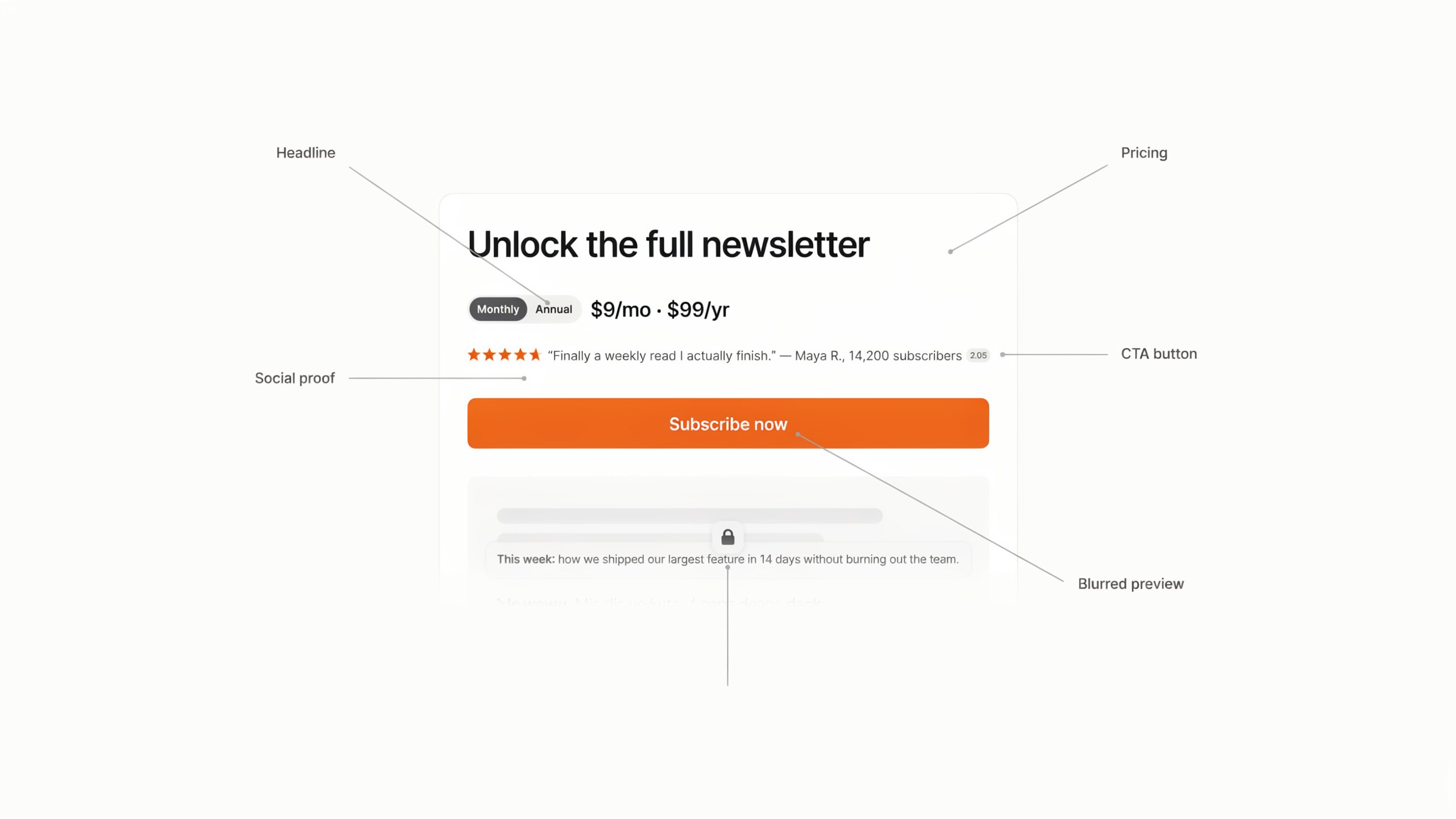
Headlines & Value Propositions
Your headline is the first thing a subscriber reads on the upgrade page. It frames the entire decision. Test different angles:
- Feature-focused: "Exclusive deep dives, interviews, and research"
- Benefit-focused: "Save 10 hours of research every week"
- Social proof-focused: "Join 1,200+ marketers who get the premium edition"
- Curiosity-driven: "The insights we only share with premium members"
Pricing Presentation
How you present your price matters as much as the price itself. Test:
- Monthly vs. annual toggle, Which option do you show first?
- Price anchoring, Show the annual price next to the monthly to highlight savings
- Daily cost framing, "$0.33/day" feels very different from "$10/month"
- Comparison to alternatives, "Less than your daily coffee"
Social Proof
Trust signals reduce the perceived risk of upgrading. Test different forms:
- Subscriber count, "Join 847 premium members"
- Testimonials from paid members about the value they get
- Dynamic proof, "23 people upgraded this week"
- Authority signals, Notable subscribers or companies in your paid tier
CTA Copy
The words on your upgrade button matter more than you think. Test:
- "Upgrade Now" vs. "Start My Premium Access"
- "Join 500+ Premium Members" vs. "Get Premium Today"
- "Start Free Trial" vs. "Try Premium Risk-Free"
- First person ("Start My Premium") vs. second person ("Start Your Premium")
Urgency & Scarcity
When used authentically, urgency accelerates decisions. Test:
- Founding member pricing, "Lock in $8/mo before it goes to $12"
- Limited-time offers, "Annual plan: 30% off this week only"
- Countdown timers, For genuine limited promotions
- Cohort scarcity, "Only accepting 100 new premium members this month"
Free vs. Paid Comparison
A clear comparison of what free and paid subscribers get can crystallize the upgrade decision. Test:
- Side-by-side feature tables with checkmarks
- Content preview, Show a blurred snippet of premium content
- Value quantification, "Premium members received 48 exclusive insights last quarter"
Page Layout & Length
The overall structure of the page influences how information is consumed. Test:
- Long-form with extensive proof, testimonials, and detailed breakdowns
- Short and punchy with a single compelling statement and CTA
- Video-first with a personal message from you explaining the value
Setting Up Humblytics on Your Beehiiv Site
Getting Humblytics running on your Beehiiv site takes about five minutes. Here's the process:
Step 1: Sign Up for Humblytics
Head to app.humblytics.com/signup and start your free trial. Your card won't be charged until the trial ends.
Step 2: Get Your Tracking Script
Once you're in the dashboard, navigate to your site settings to find your unique tracking snippet. It's a single lightweight script tag, just 36KB, that handles analytics, heatmaps, and split testing all in one.
Step 3: Add the Script to Beehiiv
- Log into your Beehiiv dashboard
- Go to Settings > Website > Custom Code
- Paste the Humblytics script into the Head section
- Save your changes
That's it. The script is now active on every page of your Beehiiv site.
Step 4: Verify Tracking
Go back to your Humblytics dashboard and visit your Beehiiv site in another tab. You should see your visit appear in real-time analytics within a few seconds.
Important: Because Humblytics is completely cookie-free, there's no need to add a cookie consent banner to your site. Your subscribers won't see any privacy popups, which means a cleaner experience and no friction before they even reach your upgrade page.
Running Your First A/B Test
Now that tracking is in place, let's set up your first split test.
Step 1: Pick Your Highest-Impact Element
For your first test, start with the element that has the biggest potential impact on conversions. We recommend testing your headline and value proposition first, it's the element that frames the entire upgrade decision and typically produces the largest swings in conversion rate.
Step 2: Create Your Variant in Beehiiv
- Duplicate your existing upgrade page in Beehiiv
- Change only the element you're testing (e.g., the headline)
- Keep everything else identical, same layout, same images, same CTA button
- Publish the variant page
Tip: Changing only one element per test is critical. If you change the headline AND the pricing AND the CTA, a winning variant tells you nothing about which change actually drove the improvement.
Step 3: Set Up the Split Test in Humblytics
- Log into your Humblytics dashboard
- Navigate to Split Testing > Create Test
- Enter your two URLs:
- Control:
yournewsletter.beehiiv.com/upgrade - Variant:
yournewsletter.beehiiv.com/upgrade-variant-b
- Control:
- Name your test something descriptive (e.g., "Headline Test: Feature vs. Benefit")
Step 4: Define Your Conversion Goal
Set the conversion goal to match the action that matters, the upgrade or payment completion. In Humblytics, you can track:
- Page visit (e.g., a "thank you" or "welcome to premium" page)
- Button click (the upgrade CTA)
- Custom events (payment confirmation)
Step 5: Set Your Traffic Split
Start with a 50/50 split. This gives both variants equal traffic and reaches statistical significance fastest. You can adjust this later if you want to limit exposure to an unproven variant.
Step 6: Launch and Wait
Hit launch and resist the urge to check results every hour. Humblytics uses server-side URL splitting, which means visitors are redirected before the page loads. There's zero flickering or layout shift, your subscribers see one clean page without any visual glitches.
5 High-Impact Tests for Newsletter Creators
Here are five specific, ready-to-implement tests that consistently move the needle for newsletter upgrade pages.
Test 1: Benefit-Driven vs. Feature-Driven Headlines
What you're testing: Does your audience respond better to what they get or what the content includes?
- Control: "Upgrade to Premium"
- Variant: "Get the insights that 1,200+ marketers pay for weekly"
Why this works: Generic headlines like "Upgrade to Premium" tell the reader nothing about the value. Benefit-driven headlines connect the upgrade to a tangible outcome. In our experience, benefit-driven headlines outperform feature lists in most newsletter niches.
Test 2: Annual vs. Monthly Pricing Default
What you're testing: Which pricing interval shown first leads to more total revenue?
- Control: Monthly pricing displayed first ($10/month)
- Variant: Annual pricing displayed first ($96/year, save 20%)
Why this works: Showing annual pricing first anchors your subscriber to a larger commitment with clear savings. The "save 20%" framing creates an immediate incentive. Some audiences prefer monthly flexibility, though, so test it rather than assume.
Test 3: Social Proof Placement
What you're testing: Where on the page do testimonials and social proof have the most impact?
- Control: Testimonials placed at the bottom of the page, below the CTA
- Variant: Testimonials placed directly next to the CTA button
Why this works: Social proof reduces perceived risk at the moment of decision. Placing testimonials next to the CTA means the subscriber reads "This newsletter is worth every penny" right as they're hovering over the upgrade button. Proximity to the decision point is often more important than volume of proof.
Test 4: Risk Reversal
What you're testing: Does reducing perceived risk with a free trial or guarantee increase upgrades?
- Control: Standard "Subscribe" button with no trial language
- Variant: "Start Free for 7 Days, Cancel Anytime" with prominent guarantee
Why this works: The upgrade decision feels risky to a free subscriber. They're not sure if the premium content is worth it. A free trial removes that risk entirely, they can experience the value before committing. The "cancel anytime" language further reduces friction.
Test 5: Content Preview with Blurred Paywall
What you're testing: Does showing a taste of actual premium content outperform generic descriptions?
- Control: Generic description of what premium includes ("Weekly deep dives, exclusive interviews, data reports")
- Variant: Actual snippet of a recent premium article with the rest blurred behind a paywall overlay and an "Unlock Full Access" CTA
Why this works: Generic descriptions are abstract. A real content preview makes the value concrete and immediate. The blurred paywall creates curiosity, the subscriber can see the content exists and looks valuable, they just can't read it yet. This is one of the most powerful techniques in subscription conversion.
How Do You A/B Test the Price Itself?
Every test above changes the page around the price. Testing the price itself is a different job: it needs a separate upgrade page per price point, a conversion goal scored in revenue rather than clicks, and enough paywall traffic to resolve. A $37.99 tier that converts twice as often as a $67.99 tier can still lose on total revenue.
It's worth doing because almost nobody does. Per beehiiv's own State of Paid Newsletters 2026 report, the median paid newsletter charges $10/month and $100/year, and that median hasn't moved since 2024. Most operators are anchored to a platform default they never validated.
It's also easy to get statistically wrong: at beehiiv's median free-to-paid rate of 0.62%, a four-price test needs roughly 241,600 paywall visitors to resolve. Two prices at a time is almost always the right call.
The full walkthrough, the sample-size math, and the decision rule for when a higher price actually earns more live in the companion guide: how to A/B test your newsletter subscription price.
How Long Should You Run Tests?
Ending a test too early is the most common mistake in A/B testing. Here's how to avoid it.
Minimum Sample Size
For reliable results, aim for at least 1,000 visitors per variant or at least 100 conversions per variant, whichever comes first. With a 2-3% conversion rate typical for newsletter upgrades, that means roughly 3,000-5,000 visitors per variant to hit 100 conversions.
Time-Based Minimums
Even if you hit your sample size target quickly, run your test for at least 2 full weeks. This accounts for:
- Day-of-week variations, Subscribers who visit on weekends may behave differently from weekday visitors
- Email send cycles, If you send newsletters on specific days, you want multiple cycles in your test
- External factors, A viral post or press mention can temporarily skew traffic quality
Use the Statistical Significance Calculator
Humblytics includes a built-in statistical significance indicator on your test results. Look for 95% confidence before declaring a winner.
You can also use the Humblytics Sample Size Calculator before launching your test to estimate how much traffic you'll need and how long the test should run.
Why You Shouldn't Peek and Quit Early
Here's the trap: you check your test after 3 days and see Variant B is winning by 15%. You're tempted to end the test and declare victory. Don't.
Early results are noisy. Small sample sizes produce wild swings that don't reflect real performance differences. What looks like a clear winner at 200 visitors often evens out by 2,000 visitors. Trust the math, not your impatience.
Analyzing Results & Iterating
Reading Your Humblytics Split Test Dashboard
When your test reaches statistical significance, your Humblytics dashboard will show:
- Conversion rate per variant, The percentage of visitors who completed your goal
- Confidence level, How certain the result is (aim for 95%+)
- Visitor count per variant, Total traffic each version received
- Revenue impact, If you're tracking revenue, the estimated dollar difference
What to Do with a Winner
When you have a statistically significant winner:
- Implement the winning variant as your new default upgrade page
- Document what you tested, why, and the result
- Plan your next test, The winning page becomes the new control for your next experiment
What to Do with a Loser
A test where the control wins isn't a failure, it's information. You now know that specific change doesn't work for your audience. Document the learning, archive the variant, and move on to the next hypothesis.
Build a Testing Culture
The real power of A/B testing isn't any single test, it's the compounding effect of continuous optimization.
Consider this: if you run one test per month and achieve a 5% relative improvement each time, after 12 months you've compounded those gains significantly. A page that converted at 2% could be converting at 3.6% by year's end, nearly double your starting point.
Keep a testing log with:
- Test name and date
- Hypothesis
- What you changed
- Result (winner, loser, inconclusive)
- Key learning
- Next test idea
This log becomes your optimization playbook, and it prevents you from repeating tests or losing hard-won insights.
Why Humblytics Is Built for Newsletter Creators
Not every analytics tool is a good fit for newsletter creators. Here's why Humblytics stands out for Beehiiv users specifically:
Lightweight Script That Won't Slow Your Pages
At 36KB, the Humblytics tracking script is a fraction of the size of tools like Google Analytics (45KB+) or Optimizely (80KB+). Your upgrade page loads fast, which matters, every 100ms of load time costs you conversions, especially on mobile.
Cookie-Free Means No Consent Banners
Humblytics doesn't use cookies. Period. That means:
- No cookie consent banners cluttering your upgrade page
- No GDPR compliance headaches related to tracking cookies
- No friction before your subscriber even sees your upgrade pitch
- Full visitor tracking without being blocked by privacy browsers or ad blockers
For newsletter creators who rely on trust and reader experience, this is a significant advantage.
Built-In Heatmaps
Before you even run an A/B test, heatmaps show you exactly how subscribers interact with your upgrade page. See:
- Where they click (and where they don't)
- How far they scroll
- Which sections get attention
- Where they drop off
This data tells you what to test. If nobody scrolls past your hero section, testing the testimonials at the bottom is pointless, you need to fix the top of the page first.
Funnel Tracking
Track the complete subscriber journey from free content to payment:
- Free newsletter → Upgrade page visit → Pricing interaction → Payment completion
See exactly where subscribers drop off in the upgrade funnel, and focus your tests on the biggest leaks.
Affordable Pricing on Every Plan
Humblytics starts at $79/month and includes A/B testing, heatmaps, and funnel tracking (5 live A/B tests on Business, unlimited on Scale). Compare that to enterprise tools that charge hundreds or thousands per month.
Server-Side Split Testing
Humblytics uses server-side URL splitting, which means:
- No page flicker, Visitors never see the original page flash before the variant loads
- Accurate results, No client-side JavaScript race conditions affecting your data
- Better user experience, The page loads once, cleanly, with no visual jank
Getting Started
You don't need a massive audience to start testing. Even with a few thousand monthly visitors to your upgrade page, you can run meaningful tests, they'll just take a bit longer to reach significance.
Here's your action plan:
- Sign up for Humblytics, Start your free trial in under a minute
- Install the script on your Beehiiv site (Settings > Website > Custom Code)
- Review your heatmap data for a week to understand current behavior
- Pick your first test, We recommend starting with a headline test (Test 1 above)
- Create your variant in Beehiiv and launch the split test
- Wait for statistical significance, Don't peek and quit early
- Implement the winner and plan your next test
The newsletter creators who monetize best aren't the ones with the biggest lists, they're the ones who systematically optimize every step of the subscriber journey. A/B testing your upgrade page is the highest-leverage optimization you can make.
Frequently Asked Questions
Does Beehiiv have A/B testing?
Yes, but only for email subject lines. Beehiiv's native A/B testing lets you test two subject lines on the Grow plan and up to four on the Scale plan, then automatically sends the best-performing one (by open rate) to the rest of your list. It does not test email content, send times, landing pages, or upgrade pages.
Can Beehiiv A/B test landing pages or upgrade pages?
No. Beehiiv lets you fully customize a paywall and upgrade page, title, benefits, button text, offers, and styling, but there's no built-in way to split traffic between two versions and measure which converts better. To A/B test a Beehiiv upgrade page or paywall, you need an external tool like Humblytics that runs server-side split tests on the page and scores them in subscription revenue.
What can you A/B test in a Beehiiv newsletter?
Natively, only subject lines. Beehiiv's own feature page states that "right now you can only test subject lines," with content testing on the roadmap. Everything else, headlines on your upgrade page, pricing and tier structure, paywall copy, CTAs, social proof placement, and page layout, has to be tested with a page-level experimentation tool layered on top of Beehiiv.
What's a good free-to-paid conversion rate for a newsletter?
Across publishers, freemium paywalls average about 0.76% (7.6 subscriptions per 1,000 visits), and most newsletters convert under 5% of free subscribers to paid. Among warm readers who actually click through to an upgrade page, conversion can run much higher, often into the low double digits for niche, high-value newsletters. The number that matters is your own baseline and whether testing moves it up.
How much money can you make on Beehiiv?
It comes down to three numbers: free subscribers × upgrade conversion rate × price. With 10,000 free subscribers, a 3% upgrade rate, and a $10/month plan, that's 300 paid subscribers and $36,000/year. Moving the conversion rate even one point through testing is worth roughly $12,000/year at that scale, and it compounds as your list grows.
How long should a newsletter upgrade-page A/B test run?
Aim for at least 1,000 visitors or 100 conversions per variant, and run it for a minimum of two full weeks to cover day-of-week and email-send-cycle swings. That's very different from Beehiiv's subject-line tests, which resolve in hours because open rates accumulate fast. Use the Sample Size Calculator, Test Duration Calculator, and Significance Calculator to plan and read your test.
Is Humblytics cookie-free, and does it need a consent banner?
Humblytics is cookie-free, so you don't need to add a cookie consent banner to your Beehiiv site for it. That keeps a clean, friction-free experience right up to the moment a reader sees your upgrade offer. The script is about 36KB and handles analytics, heatmaps, and split testing in one tag.
How much does Humblytics cost?
Plans start at $79/month and include A/B testing, heatmaps, and funnel tracking. You can start a free trial: your card won't be charged until the trial ends.
Free Resources
- Sample Size Calculator, Plan how long to run your tests before launching
- Test Duration Calculator, Estimate how long your test needs to run
- Significance Calculator, Check whether your result is real or noise
- UTM Builder, Track which traffic sources drive the most upgrades
- A/B Testing Statistical Significance Explained, Deep dive into the statistics behind split testing
- Landing Page A/B Testing: Proven Tips, Tactics that carry straight over to upgrade pages
Questions about setting up A/B tests on your Beehiiv site? Contact us, we're happy to help you launch your first test.
Sources
- beehiiv, Email A/B Testing Tool for Newsletters (subject-line testing scope, "right now you can only test subject lines")
- beehiiv, A/B Testing: The Key to Unlocking Better Email Newsletter Performance (sample size, duration, Grow vs. Scale plans)
- beehiiv, The State of Paid Newsletters 2026 (median $10/month and $100/year across thousands of publications, unchanged since 2024)
- Business Research Insights, Daily Newsletters Market report ($16.08B in 2026 → $27.08B by 2035)
- Juniper Research, Subscription Economy Market report ($722B in 2025 → $1.2T by 2030)
- The Audiencers, What explains subscription conversion success (0.76% freemium paywall benchmark) and Increase conversion by 46% (compounding funnel math)
Ship your first A/B test before this article ends.
Visual editor, no dev ticket, agent picks the winner. Dedication Agents lifted conversion 28% on their first test. ToForm went from 2% to 8% bookings.