Beehiiv Paywall: How to Set Up and Optimize One for More Paid Subscribers (2026)
A step-by-step 2026 guide to setting up a Beehiiv paywall, standard vs. metered, paywall breaks, and the conversion levers that turn free readers into paid. Plus how to A/B test the paywall Beehiiv can't.
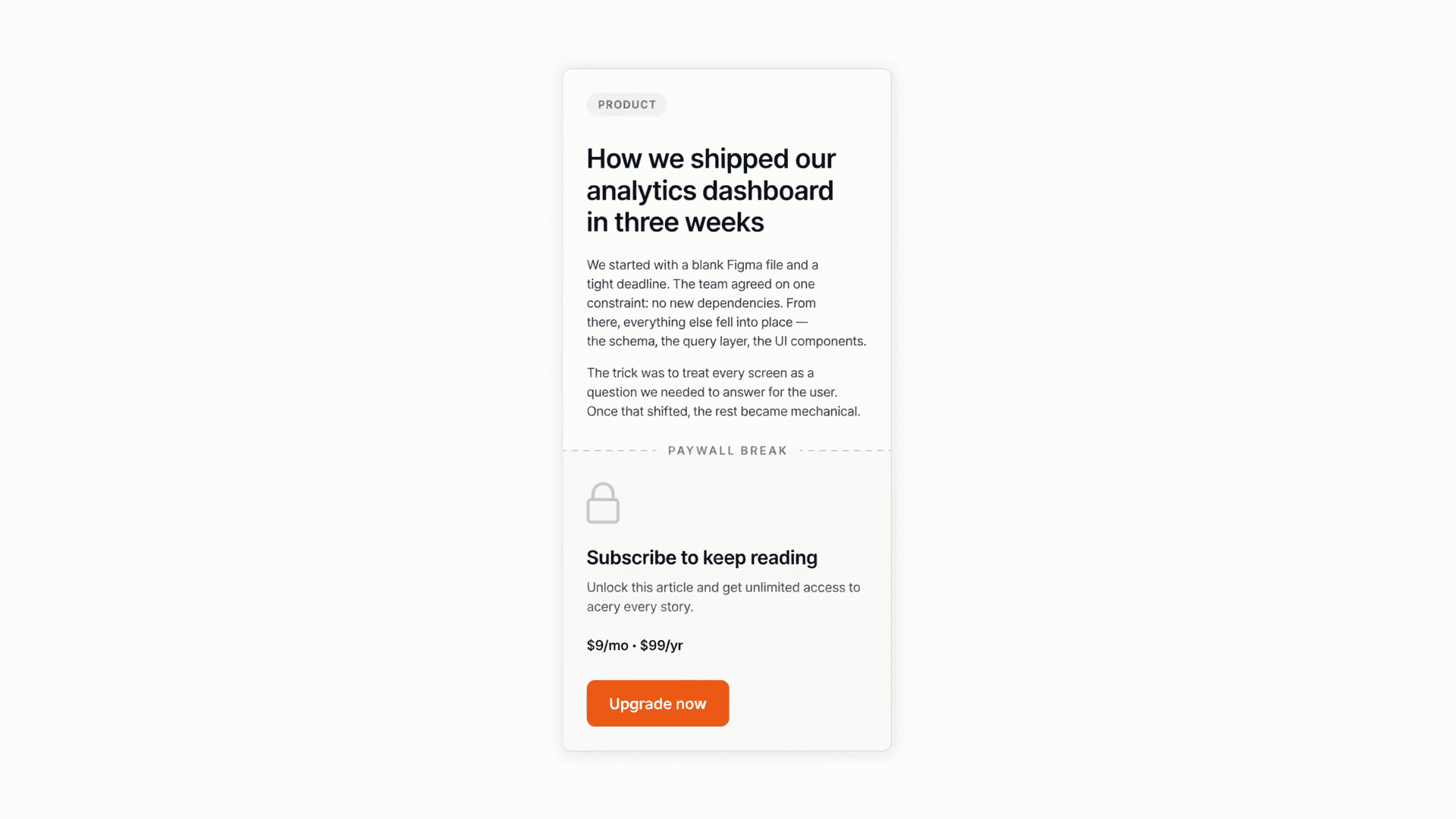
The short answer: A Beehiiv paywall hides premium content behind a subscribe prompt so free readers have to upgrade to keep reading. You set one up under Subscriptions → Paid Tiers → Paywalls (paid Beehiiv plans only), then either lock a whole post or drop a "paywall break" mid-post. Beehiiv lets you fully customize the paywall, title, benefits, button, offer, but it can't A/B test which version converts best. For that, test the paywall page in revenue. See also: A/B testing Beehiiv upgrade pages.
Your paywall is the single most important screen in your whole newsletter business. It's the exact moment a free reader decides whether your premium content is worth their credit card. Get it right and a slice of your list starts paying you every month. Get it wrong and all that audience growth never turns into revenue.
Most creators set their paywall up once, accept Beehiiv's defaults, and never touch it again. That's a mistake. Freemium paywalls convert an average of just 0.76% of visits to paid (The Audiencers), so every element on that screen is doing real work, or leaking real money.
This guide covers how to set up a Beehiiv paywall from scratch, the three paywall types and when to use each, the levers that actually move conversions, and the one thing Beehiiv can't do for you: tell you which version of your paywall makes the most money.
What is a Beehiiv paywall?
A Beehiiv paywall is a subscribe prompt that blocks premium content from free readers and asks them to upgrade to a paid tier to see it. It appears either as a full-post lock or as a "paywall break" partway through a post, and it can show on the email version, the web version, or both. Beehiiv supports two models: standard paywalls (free vs. paid content you choose) and metered paywalls (free readers get a set number of posts before the wall appears).
The paywall is where your monetization strategy meets your reader's wallet. It pulls together your offer, your pricing, your benefits, and your social proof in one screen, which is why small changes there move revenue more than almost anything else you can tweak.
One detail trips people up constantly: in Beehiiv, the email audience and web audience are controlled separately. You can send a full post to every email subscriber while the web version stays locked to paid readers, or vice versa. Always check both settings so the paywall fires where you intend.
Which Beehiiv plan do you need for a paywall?
Paywalls and paid subscriptions are available on paid Beehiiv plans only, they're switched off on the free tier. Once paid subscriptions are enabled, your account gets a Default paywall automatically, and payments run through Stripe, which Beehiiv connects for you. You can toggle paid subscriptions on or off at any time.
Before you build the paywall itself, you need at least one paid subscription tier with a price set (monthly, annual, or both). Beehiiv lets you run multiple tiers, for example a standard premium plan and a higher "founding member" plan, each with its own benefits and price. The paywall then points readers at whichever tier and offer you choose.
How to set up a Beehiiv paywall, step by step
Setting up a standard paywall takes about ten minutes once paid subscriptions are on. Here's the flow, straight from Beehiiv's paywall documentation (updated May 2026).
Step 1: Open your paywall settings
From the left panel, go to Subscriptions, then the Paid Tiers tab. Scroll down to Paywalls. If paid subscriptions are enabled, you'll see a Default paywall marked with a check. Click Add Paywall to build a custom one, or use the three-dots menu to edit the default.
Step 2: Fill in the paywall fields
A new paywall form opens with a live preview on the left and the controls on the right. The fields:
- Smart fill from Paid Subscription Tier, select a tier to auto-populate its benefits, so you're not retyping them.
- Name (required), internal label only; readers never see it.
- Image (optional), a square image is recommended; you can also hide it.
- Title (required), the prominent headline, the first thing readers notice.
- Description (required), a short line guiding readers on what to do next.
- Button (required), defaults to "Upgrade"; change it to something specific.
- Benefits (optional), add a benefits header, then list benefits one at a time (drag to reorder, click the x to remove).
- Offer (optional), attach a discount or free trial. When readers click the button, they land on that offer's upgrade page with the discount or trial pre-applied.
- Styles (optional), set background color, text color, button colors, and the shadow around the popup.
Step 3: Save it
Click Save (or Create for a new one). Your paywall appears under Paywalls, where the three-dots menu lets you Edit, Delete, Duplicate, or Set as Default.
Step 4: Apply the paywall to a post
You have two ways to put the paywall in front of readers, covered next.
Paywall break vs. full-post lock vs. metered access
Beehiiv gives you three ways to gate content, and the right one depends on how much you want free readers to see before they hit the wall.
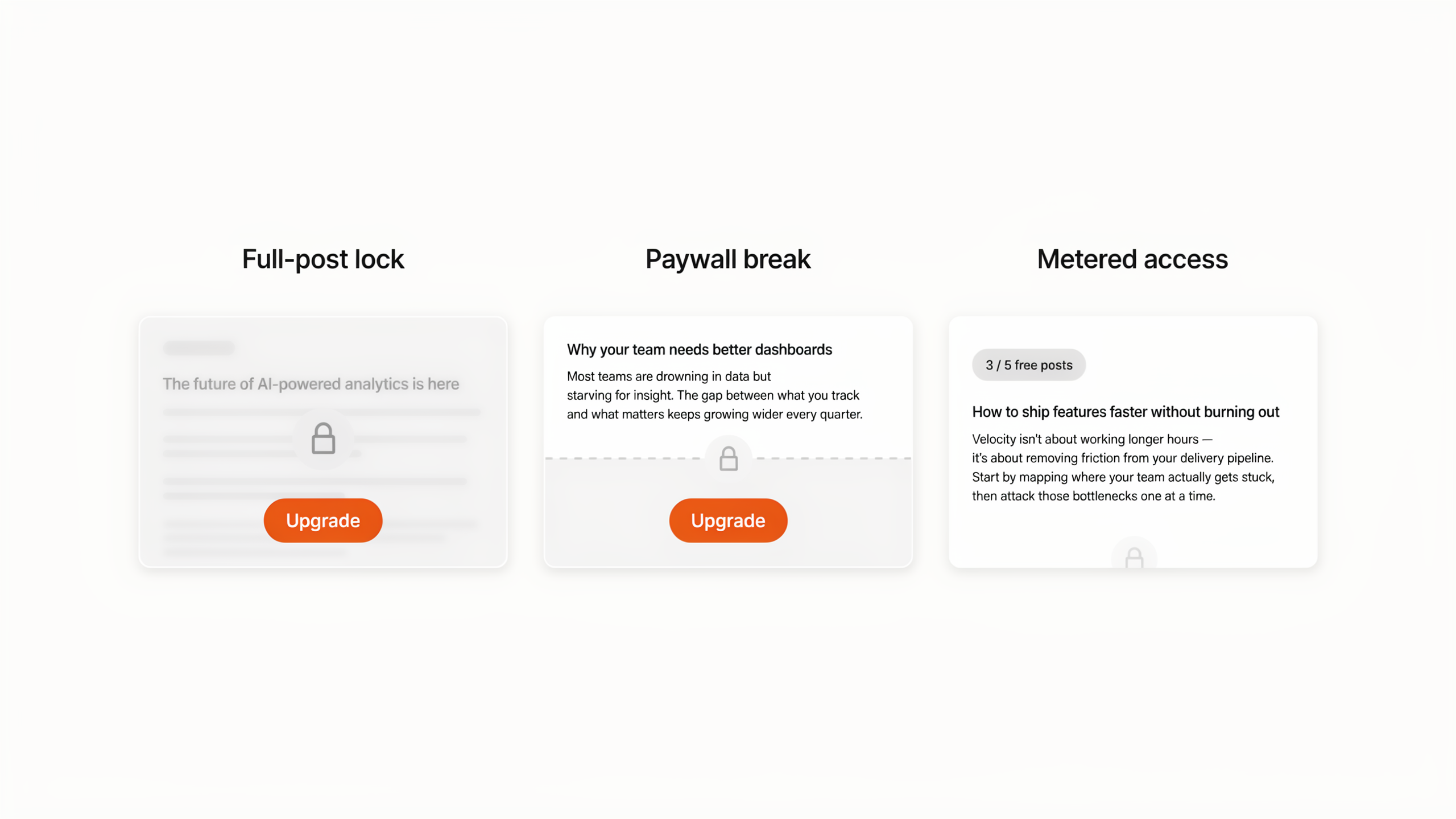
Full-post lock. Restrict an entire web post to paid subscribers. In the Post Builder, open the Audience tab, and under Web Audience select a paid tier or All Paid Subscribers. The default paywall shows in place of the post. Use this for content that's premium end to end.
Paywall break. Show the opening of a post free, then cut readers off at a chosen point. On the Compose tab, type a forward slash and choose Paywall Break, then pick which paywall to display. Free readers hit the wall as they scroll past that section. One limit: breaks can only go between existing sections, not inside one. This is the highest-converting pattern for most newsletters, because readers get hooked on real content before they're asked to pay.
Metered access. Let free readers through a set number of posts before any paywall appears, similar to a news-site meter. Use this when habit and volume matter more than locking every issue.
A practical default: lead with paywall breaks on your best posts so readers taste the value first, reserve full-post locks for clearly premium pieces, and consider a meter only once you have a steady publishing cadence.
How to optimize your Beehiiv paywall for conversions
Once the paywall is live, treat every field as a conversion lever, not a form to fill in once. Free-to-paid conversion is usually well under 5%, and often under 1% per visit (The Audiencers), so the gains come from sharpening each element. The compounding math is the encouraging part: lift each step of the funnel by 10% and overall subscription conversion can rise about 46% (The Audiencers).
The levers that matter most:
- Title. Lead with the outcome, not "Upgrade to Premium." "Get the trade ideas before markets open" beats a generic label.
- Benefits. Translate features into outcomes. "Two extra issues a week" becomes "never miss the three moves that matter before Monday."
- Button copy. Specific and first-person tends to win. Test "Start my premium access" or "Unlock full access" against the default "Upgrade."
- Offer. A free trial or a clear discount lowers the perceived risk of a first payment. Try a 7-day trial against a percentage-off offer.
- Placement. Where you set the paywall break changes everything. Cut too early and readers haven't bought in; cut too late and they've already gotten what they came for.
- Social proof. Beehiiv's paywall fields are limited here, but your post content right before the break can carry a subscriber count or a one-line testimonial.
Here's the problem, though: how do you know which title, which offer, or which break placement actually makes you the most money? Guessing is exactly what leaves that 0.76% baseline where it is.
Why you can't A/B test your paywall inside Beehiiv (and what to do)
Beehiiv's built-in A/B testing only covers email subject lines, in Beehiiv's own words, "right now you can only test subject lines." It can't randomly split readers between two paywalls or two upgrade pages and tell you which converts more subscribers. You can configure the paywall in Beehiiv; you can't test it there.
That's the gap Humblytics fills. It runs server-side split tests on the page where the upgrade actually happens, and scores the winner in subscription revenue (MRR) rather than clicks, so you can finally answer "does the $8 founder price or the 7-day trial make more money?" with data instead of a hunch. Because Beehiiv runs payments through Stripe, the revenue from each variant ties back to the paywall the reader saw.
The clean division of labor: use Beehiiv to win the open with subject-line tests, and test the paywall and upgrade page itself in Humblytics to win the upgrade. For the full walkthrough, see How to A/B test newsletter upgrade pages with Beehiiv + Humblytics. The script is cookie-free and about 16KB, so it won't slow your pages or trigger a consent banner, and plans start at $79/month with A/B testing included on every plan.
Common Beehiiv paywall problems (and fixes)
A few issues come up again and again. Beehiiv's support doc covers the fixes:
- Paywall shows in email but not on the web. Check the Web Audience setting on the post's Audience tab, it needs to be a paid tier or All Paid Subscribers, not "All subscribers." Confirm a paywall break is inserted and a paywall is selected.
- Paywall text won't update after edits. Changes go live within seconds. If you don't see them, open the post URL in a private or incognito window to rule out a cached version.
- A subscriber still sees the paywall after paying. This is almost always a login or session issue. Have them log in via the link in their payment confirmation email; access should then reflect correctly.
- Readers land in the wrong place after paying. By default they're sent to your homepage. To change it, set the Redirect URL after purchase field in each tier's Advanced Options (it's configured per tier).
Frequently asked questions
Does Beehiiv have paywalls? Yes. Beehiiv supports standard paywalls (you choose which content is free vs. paid) and metered paywalls (free readers get a set number of posts before the wall). Both are available on paid Beehiiv plans, with payments handled through Stripe.
Can you A/B test a Beehiiv paywall? Not inside Beehiiv. Its native A/B testing only tests email subject lines. To split-test paywall copy, pricing, or break placement and read the winner in revenue, you need an external tool like Humblytics that runs the test on the page itself.
What plan do I need for a Beehiiv paywall? Any paid Beehiiv plan. Paywalls and paid subscriptions are turned off on the free tier. Once you enable paid subscriptions, Beehiiv connects Stripe and gives you a default paywall to customize.
Is enabling premium subscriptions on Beehiiv worth it? It can be, but free-to-paid conversion is modest, typically under 5% of free readers, and often under 1% per visit. The newsletters that make it work treat the paywall as something to optimize over time, not a one-time setup, and they price against the real value their niche gets.
What's the difference between a paywall break and a metered paywall? A paywall break locks a specific post at a point you choose (free readers see the intro, then hit the wall). A metered paywall lets readers through several full posts before any wall appears. Breaks reward you with higher intent per prompt; meters favor habit and reach.
Can I paywall only the web version of a post? Yes. Beehiiv controls the email audience and web audience separately, so you can email a post to everyone while keeping the web version locked to paid subscribers, or any combination you want.
Sources
- How to create and apply standard paywalls, beehiiv Help (paywall fields, paywall breaks, troubleshooting; updated May 2026)
- Email A/B Testing Tool for Newsletters, beehiiv (native A/B testing is subject-line only)
- The Audiencers, What explains subscription conversion success (0.76% freemium paywall benchmark)
- The Audiencers, Increase subscription conversion by 46% (compounding funnel math)